Fixed Deployment Times
Fixed deployment times is a premium feature. To use this feature, you need a premium subscription.
With fixed deployment times, you define on which days and at what times an employee works. This configuration automatically affects vacation calculation and shift validation.
Finding the Feature
You can find the "Fixed Deployment Times" setting in the employee profile:
- Go to Employees in the main menu
- Click on an employee to open their profile
- Switch to the Working Hours tab
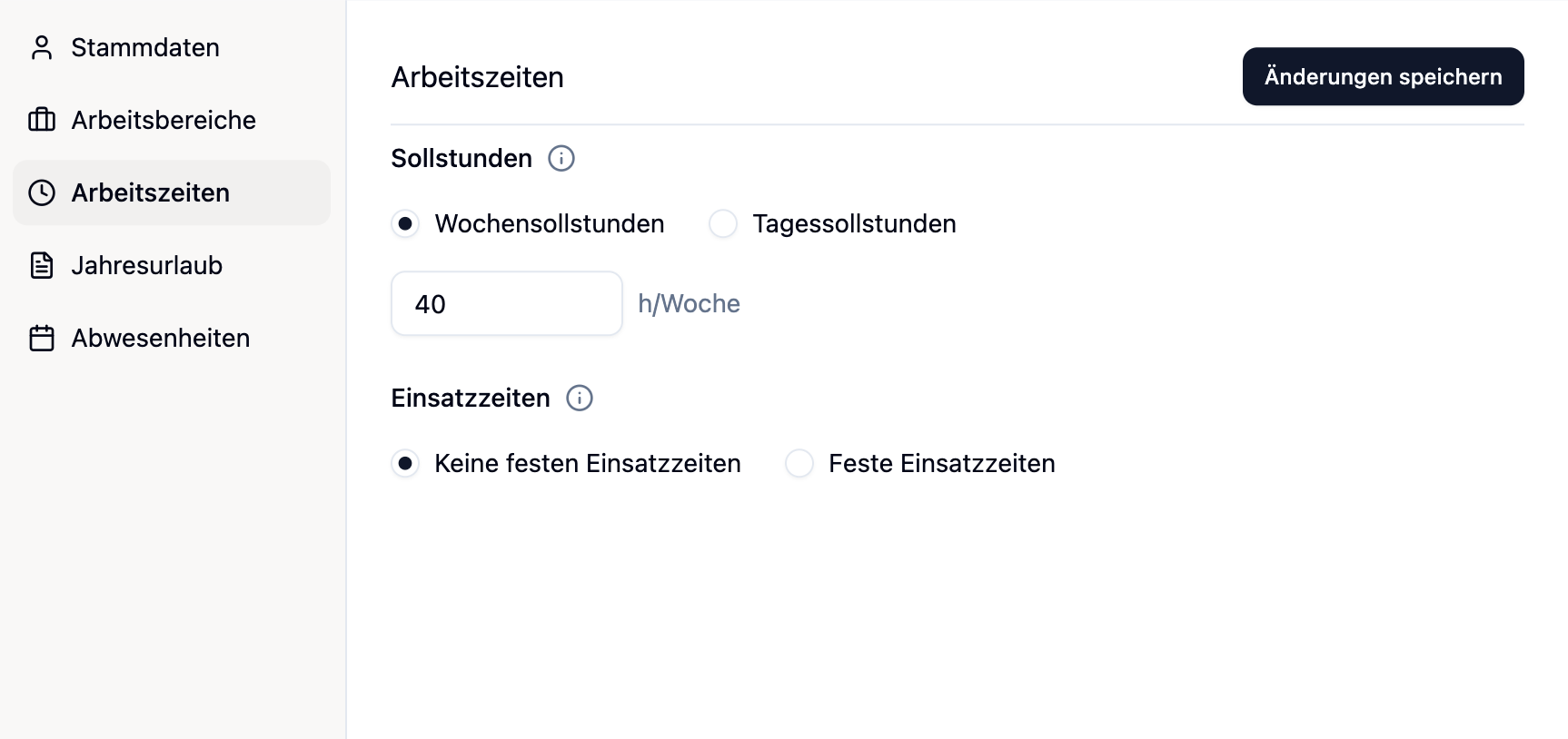
Configuration
Two Modes
You have two options:
| Mode | Description | When to use? |
|---|---|---|
| No fixed deployment times | The employee has no fixed deployment times and can always work. | Employees with flexible working hours |
| Fixed deployment times | For each weekday, you define whether and when work is done. | Employees with a regular work rhythm |
Configuring Work Days
When you activate "Fixed deployment times", an overview of all seven weekdays appears:
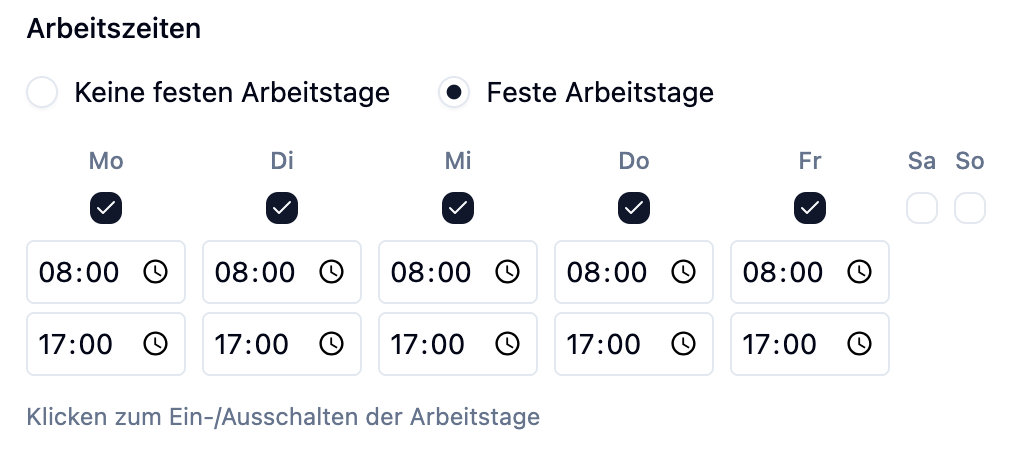
For each day you can set:
| Option | Meaning |
|---|---|
| Full day | The employee works on this day. You enter start and end times. |
| Off | The employee does not work on this day. This day does not count as a work day. |
Entering Times
For each work day ("Full day"), you enter the working hours:
- Start time: When does work begin?
- End time: When does work end?
For night shifts that go past midnight (e.g., 22:00 - 06:00), the system automatically recognizes that the end time is on the following day.
Effects on Other Functions
Target Hours
Fixed deployment times have no effect on an employee's target hours. They only define when work happens — not how many hours. To specify the number of hours, configure the target hours (weekly or daily).
Vacation Calculation
Fixed deployment times directly affect how vacation days are calculated.
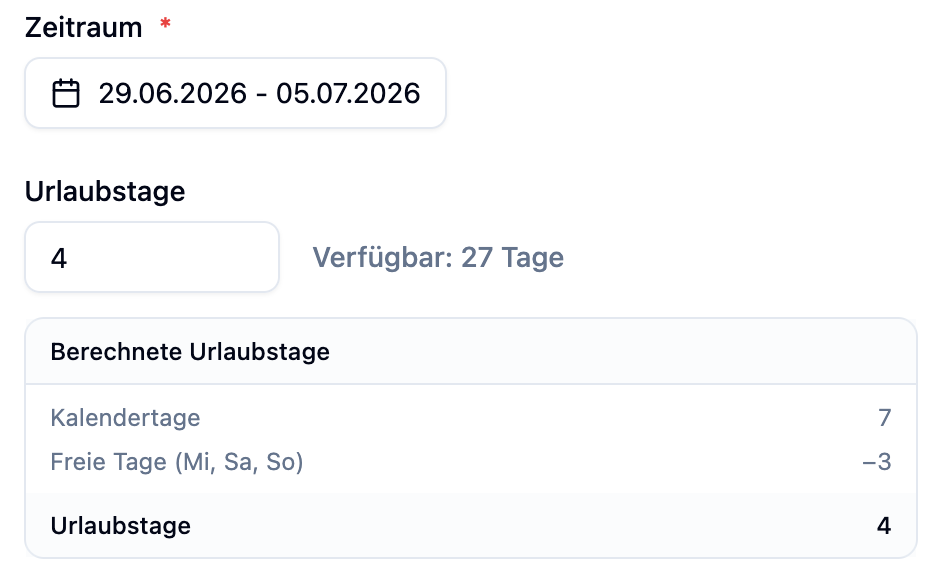
Without Fixed Working Hours (Default)
The system assumes the employee works Monday to Friday:
- Saturdays and Sundays are automatically deducted
- Holidays are deducted if they fall on Mon-Fri
With Fixed Working Hours
The system uses the configured work days:
- Only days with "Full day" status count as work days
- Days with "Off" status are not counted as vacation days
- Holidays are only deducted if they fall on a work day
Employee: Lisa works Monday to Thursday, Friday is off.
Vacation: January 13 (Monday) to January 17 (Friday)
| Calculation | Without fixed deployment times | With fixed deployment times |
|---|---|---|
| Counted days | Mon, Tue, Wed, Thu, Fri = 5 days | Mon, Tue, Wed, Thu = 4 days |
| Vacation days | 5 vacation days | 4 vacation days |
Result: Lisa saves 1 vacation day because Friday doesn't count as a work day.
Employee: Max works Monday to Thursday.
Scenario: May 1st (holiday) falls on a Friday.
| Calculation | Without fixed deployment times | With fixed deployment times |
|---|---|---|
| Holiday counts? | Yes (Friday = work day) | No (Friday = off) |
Result: For Max, this holiday has no effect on his vacation entitlement.
Rule System (Shift Validation)
Fixed deployment times are part of the rule system. When activated, medishift checks during shift planning:
- Work day check: Is a shift planned on a day off?
- Time window check: Is the shift within the configured working hours?
Warnings in the Shift Plan
If you try to assign an employee a shift that doesn't match their working hours, you'll see a warning:
Examples of warnings:
| Situation | Warning |
|---|---|
| Shift on a free Saturday | "Max doesn't work on Saturdays" |
| Shift outside the hours | "Lisa only works 08:00 - 17:00 on Mondays" |
These checks are warnings, not hard blocks. You can still make the assignment if there's a good reason (e.g., covering for someone).
Employee Dropdown
In the employee dropdown when staffing shifts, conflicts are displayed directly:

This helps you quickly see which employees are available for a specific shift.
Practical Examples
Sarah works Monday to Thursday, 08:00 - 16:30 each day.
Configuration:
| Day | Status | Start time | End time |
|---|---|---|---|
| Monday | Full day | 08:00 | 16:30 |
| Tuesday | Full day | 08:00 | 16:30 |
| Wednesday | Full day | 08:00 | 16:30 |
| Thursday | Full day | 08:00 | 16:30 |
| Friday | Off | - | - |
| Saturday | Off | - | - |
| Sunday | Off | - | - |
Effects:
- Vacation days are only counted for Mon-Thu
- Warnings appear when shifts are planned on Fridays
Thomas works night shifts from Wednesday to Sunday.
Configuration:
| Day | Status | Start time | End time |
|---|---|---|---|
| Monday | Off | - | - |
| Tuesday | Off | - | - |
| Wednesday | Full day | 22:00 | 06:00 |
| Thursday | Full day | 22:00 | 06:00 |
| Friday | Full day | 22:00 | 06:00 |
| Saturday | Full day | 22:00 | 06:00 |
| Sunday | Full day | 22:00 | 06:00 |
Effects:
- Vacation days count only for Wed-Sun
Julia works Thursday to Monday (off: Tue + Wed).
Configuration:
| Day | Status | Start time | End time |
|---|---|---|---|
| Monday | Full day | 09:00 | 17:00 |
| Tuesday | Off | - | - |
| Wednesday | Off | - | - |
| Thursday | Full day | 09:00 | 17:00 |
| Friday | Full day | 09:00 | 17:00 |
| Saturday | Full day | 09:00 | 17:00 |
| Sunday | Full day | 09:00 | 17:00 |
Effects:
- Vacation days are counted for Thu-Mon (not Tue-Wed)
- Holidays on Tuesday or Wednesday have no effect
- The rule system takes the unusual work week into account
Frequently Asked Questions
Do I need to set up fixed deployment times for every employee?
No. Fixed deployment times are optional. If you don't configure them, the system uses the standard work week (Monday to Friday).
What happens if I change the working hours?
Changes take effect immediately. Already approved absences are not automatically recalculated. You can adjust these manually if needed.
Can I configure night shifts?
Yes! Simply enter an end time that is before the start time (e.g., Start: 22:00, End: 06:00). The system automatically recognizes this as a night shift.
Summary
| Aspect | Effect |
|---|---|
| Vacation calculation | Only configured work days count as vacation days |
| Holidays | Only deducted if they fall on a work day |
| Shift planning | Warnings for conflicts with working hours |
| Employee dropdown | Shows availability hints based on working hours |
Configure fixed deployment times for all employees with regular work patterns - especially for part-time and shift work. This gives you more accurate vacation calculations and helpful warnings during shift planning.